Fensory connection guide
Connect Codex to Fensory
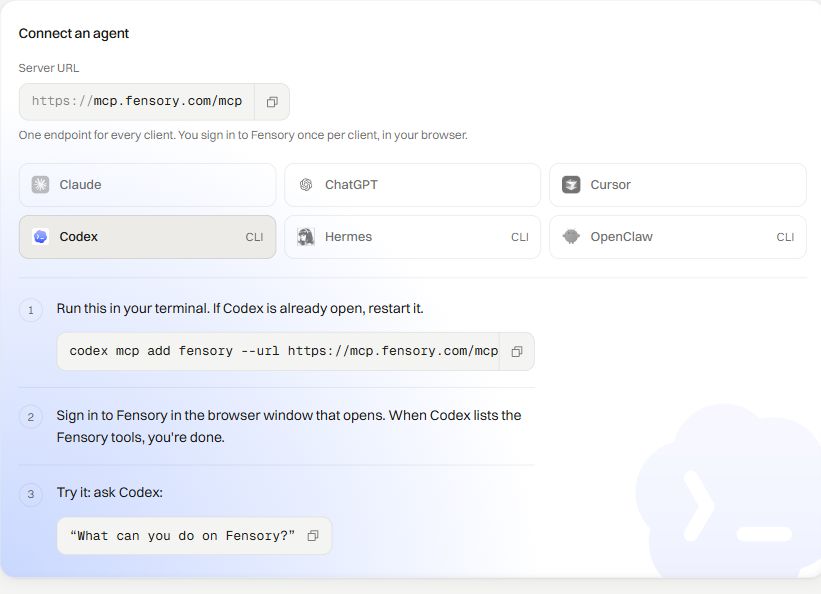
Codex connects to Fensory as a remote Streamable HTTP MCP server. Add the Fensory endpoint with one CLI command, complete browser OAuth and restart Codex if it was already open.
The command below is published in the Fensory app and matches the current Codex CLI syntax for remote MCP servers. Fensory is not available to US persons.
What you need
A current Codex CLI installation and an eligible Fensory account.
Connect Codex
Use the remote Fensory server and complete OAuth with the account you want the assistant to reach.
codex mcp add fensory --url https://mcp.fensory.com/mcp- 01
Add the Fensory server
Run the command above in your terminal. It saves Fensory as a remote MCP server named fensory.
- 02
Complete browser sign-in
Codex opens the Fensory OAuth flow in your browser. Sign in to the Fensory account you want Codex to use and approve the connection.
- 03
Restart and confirm the tools
Restart Codex if it was already open, then ask what it can do on Fensory or run codex mcp list to confirm that the server is configured.
- 04
Start with a read-only prompt
Check account status, limits or available markets before enabling agentic trading or asking Codex to place an order.
Example prompts for Codex
Use these examples to check the connection, account and instrument before any order is submitted. Adapt the amount and market to your own account controls.
List the Fensory tools available to Codex and group them into read actions and trading actions.
Tool checkShow my account status and current trading limits. Do not place or cancel any order.
Account checkInspect xyz:TSLA and prepare a valid order request with every parameter explained. Do not execute it.
Request previewSet account limits before the first order
Fensory enforces three controls on the account: a kill-switch, a market allow-list and a per-order cap.
See the controls
What to know about Codex
Restart after adding the server
If Codex was already running when you added Fensory, restart it so the saved MCP configuration is loaded.
OAuth chooses the Fensory account
The browser flow connects the Fensory account used during authorization. Use the account whose markets and limits Codex should reach.
The Fensory account controls still apply
Adding the MCP server does not override a kill-switch, a market allow-list and a per-order cap.
Questions people ask
- What command connects Codex to Fensory?
- Run codex mcp add fensory --url https://mcp.fensory.com/mcp. The name fensory identifies the saved server and the URL points Codex to the remote Streamable HTTP endpoint.
- Do I need to add an authentication flag?
- No. Use the command exactly as shown. Codex opens the browser OAuth flow when the server needs authorization.
- How do I confirm Fensory was added?
- Run codex mcp list or restart Codex and ask what it can do on Fensory. Start with a read-only account or market request.
- Does Codex receive my private key?
- No. The connection uses browser OAuth. On the current MCP path, Hyperliquid trades use a scoped signing key that cannot withdraw, transfer or bridge funds.
- Can the Codex connection withdraw funds?
- No. On the current MCP path, the Hyperliquid agent key cannot withdraw, transfer or bridge funds, and the account controls continue to apply to tool calls.