Strategy guide
Let Claude trade stock futures through MCP
Claude can reach stock prices through the Fensory MCP server and place an order once you connect an eligible Fensory account, enable agentic trading and set account limits. On the MCP path, stock names such as TSLA and NVDA resolve to perpetual futures on Hyperliquid builder dexes, not to tokenized shares.
That instrument distinction belongs in the first instruction. A stock perpetual future gives price exposure, uses margin and can be liquidated. A tokenized equity is an issuer-created token tied to a stock or ETF under the issuer’s terms. The tokenized equities shown in the Fensory app are separate from the stock perpetual futures traded through MCP. Fensory is not available to US persons.
Copy this prompt
Use the Fensory tools to inspect xyz:TSLA as a stock perpetual future. First call get_perps_status, get_market and get_account_state. State the venue, mark price, maximum leverage, my current position, available balance, market allow-list and per-order cap. Do not describe this as a share or tokenized equity.

If the market is available and my account permits it, prepare a limit order worth no more than $25 at a price I specify. Do not change leverage or margin mode. Do not place, cancel or replace any order until you show the full order, estimated fee, liquidation risk and ask for my explicit confirmation for that exact action. Stop if the symbol resolves to a different instrument, the price is stale or the order would exceed an account limit.Who this is for
This guide is for an eligible Claude user who wants to test a small, explicitly confirmed stock perpetual-futures order while keeping the market and order size bounded at the account layer.
What it is not
It is not a guide to buying a share, receiving a dividend or building an unattended strategy. It does not tell Claude which company to trade. The example verifies the instrument and prepares one small order for your confirmation.
What you need
Claude with custom connectors
Anthropic documents remote custom connectors for Claude Free, Pro, Max, Team and Enterprise. Free accounts may add one custom connector, while Team and Enterprise owners control organization connectors.
An eligible Fensory account
Fund the account, enable agentic trading, allow the exact stock-futures market and set a per-order cap before Claude can submit an order.
A loss amount you can accept
A per-order cap limits one order. It does not cap total losses, prevent several allowed orders or remove liquidation risk.
What the agent does
01
Check that perpetual-futures trading is enabled
Claude reads whether perpetual-futures execution is active before it discusses an order. A working OAuth connection proves the server can identify you; it does not prove this market or trading action is enabled.
Tools: get_perps_status
02
Resolve the instrument
For a stock name, the MCP tool resolves the builder-dex perpetual under a prefixed symbol such as xyz:TSLA. Claude should state that it is a derivative with no share ownership before it continues.
Tools: get_market
03
Read the account before sizing anything
The existing position, available balance and open orders change what another order would do. Reading them first also catches a duplicate order that is already resting.
Tools: get_account_state · get_open_orders
04
Prepare one bounded order
The order value stays below both the prompt ceiling and the account cap. Claude must show the symbol, side, order type, size and price and ask for confirmation in the client before it submits. That confirmation is a client instruction, not an account-enforced limit.
Tools: place_perps_order
05
Verify the result
A submitted order may rest, fill partly or fill completely. Claude should report the actual state rather than treating a successful tool call as proof of a completed trade.
Tools: get_order_status · get_fills · get_open_orders
Failure modes and limits
The ticker hides the instrument
TSLA can refer to a tokenized equity in the app and a perpetual future over MCP. The prompt forces Claude to identify the instrument before any order, because the custody, fees and risks are different.
The price moves while you review
A mark price or order book is a snapshot. Use a limit order when the exact price matters, then re-read the market if the confirmation takes long enough for the quote to become stale.
The order fills partly
A partial fill leaves both a position and a resting remainder. Read the fill and open-order records before deciding whether to leave, cancel or replace anything.
Margin creates liquidation risk
A small order can still be liquidated when it is leveraged. The prompt tells Claude not to change leverage and to state the liquidation risk before asking for confirmation.
One cap is not a daily loss limit
The Fensory cap applies to a single order. It does not stop several permitted orders from losing money. Keep the example supervised and use the kill-switch when you want all trading tools to stop.
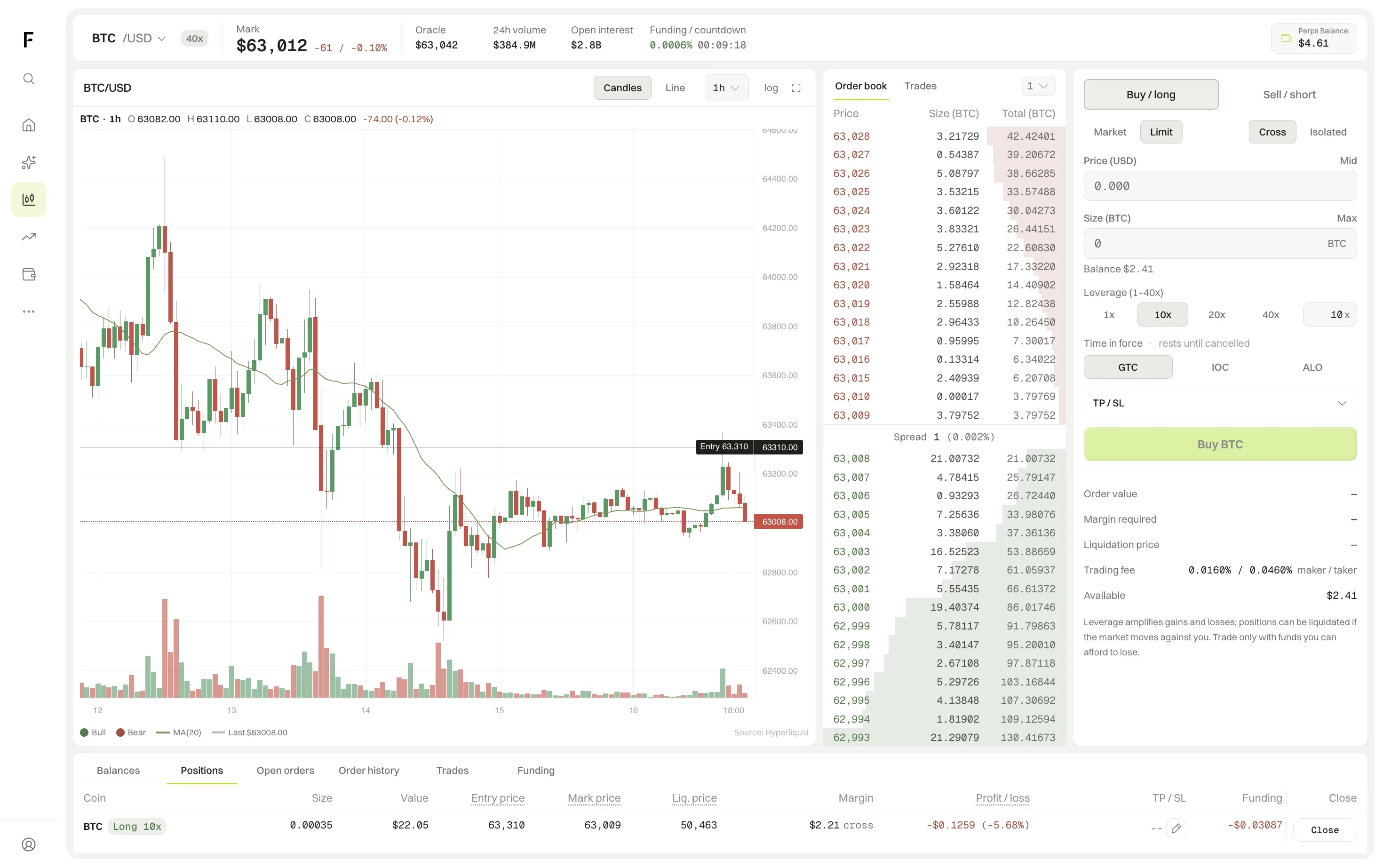
Read the result in the terminal
- Positions
- Check the instrument, side, size, entry price, mark price, margin, liquidation price and unrealized profit or loss. A stock name in this view is still a perpetual-futures position.
- Open orders
- A limit order that has not fully filled remains here. Compare the remaining size with the fills before asking Claude to do anything else.
- Trades and funding
- The fill record is the evidence that the order executed. Funding is a separate recurring payment between long and short holders and can change while the position is open.
Runs on
The client list comes from the same release record as the MCP page. The first four have their own setup guides.
Questions people ask
- Can Claude buy a Tesla share through the Fensory MCP server?
- No. On the MCP path, TSLA resolves to a perpetual future on a Hyperliquid builder dex. It gives price exposure and does not convey a share, a dividend or ownership in Tesla. Tokenized equities shown in the Fensory app are a separate instrument.
- Does Claude need my private key?
- No. Claude connects over OAuth. On the current MCP path, Hyperliquid trades use a scoped signing key that can sign trades and cannot withdraw, transfer or bridge funds.
- Why does the prompt ask for explicit confirmation?
- It keeps this example supervised. Claude shows the symbol, side, size, price and order type so you can approve or reject that specific order. This prompt instruction is separate from Fensory account controls such as the market allow-list and per-order cap.
- Can I stop Claude after connecting it?
- Yes. Switch agentic trading off in Fensory to make every trading tool fail. You can also disable or remove the connector in Claude.
- Does a $25 order cap mean I can lose only $25?
- No. The cap limits the value of one order. It does not cap total losses or stop several allowed orders. A leveraged perpetual-futures position can also lose more than the margin committed.