Strategy guide
Set trading limits for an AI agent
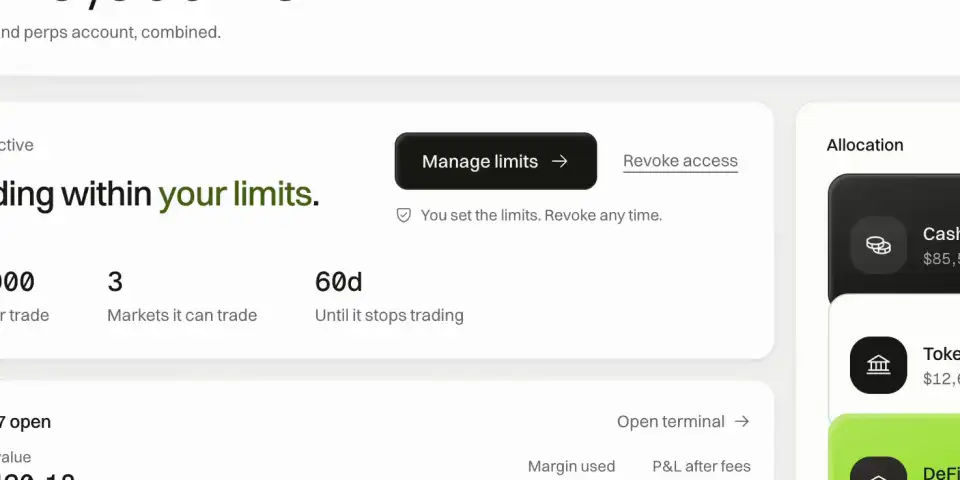
Fensory checks whether agentic trading is enabled, whether access has expired, the market allow-list and the hard cap on one order before an agent order reaches a venue. Those checks do not depend on the assistant remembering a prompt.
These controls reduce what an agent can do and do not make trading safe. The per-order cap is not a daily loss limit, an allowed market can still fall, and disabling agentic trading stops new trading actions without reversing fills that already happened. Fensory is not available to US persons.
Copy this prompt
Read my Fensory account controls and report them without changing anything. Show whether agentic trading is enabled, the per-order cap, every allowed market, current positions and all open orders. Separate spot from perpetual futures and identify any shared ticker that refers to different instruments.

Then test these three hypothetical orders against the controls: one order $1 below the cap, one exactly at the cap and one $1 above it. Do not submit, cancel or replace anything. Explain which request the account would accept or reject, what the per-order cap does not limit, and how I would stop all new trading actions by disabling agentic trading in the app.Who this is for
This guide is for anyone connecting Claude, ChatGPT, Hermes, OpenClaw, Codex or Cursor to a funded Fensory account and deciding what the assistant may trade before enabling agentic trading.
What it is not
It is not an investment policy and it does not select markets for you. The controls contain execution permissions. They do not predict prices, guarantee a maximum total loss or replace checking positions and open orders.
What you need
A Fensory account you control
Limits are changed in the app with your signed-in account. An assistant cannot raise its own ceiling through a prompt.
A short market list
Approve only the exact instruments you intend to test. Spot and perpetual futures are authorized separately, and a shared ticker can describe different instruments.
A per-order ceiling
Choose a value you can inspect without treating it as a total-loss cap. The same ceiling may permit several orders unless you stop the agent or remove the market.
What the agent does
01
Keep agentic trading disabled while you configure
Fund and inspect the account first. With agentic trading disabled, an assistant can use read tools while trading tools fail.
02
Choose the exact markets
Use the market tools to distinguish spot, tokenized assets and perpetual futures. Add only the intended instrument to the account allow-list; enabling a ticker name without checking the instrument is not enough.
Tools: get_all_markets · get_market · get_spot_metadata
03
Set the maximum size of one order
The cap is checked before an order reaches a venue. Set it in the app, then ask the connected assistant to read the account so the displayed ceiling and the account response agree.
Tools: get_account_state · get_spot_account_state
04
Test with read-only scenarios
Ask the assistant to evaluate orders below, at and above the ceiling without submitting them. The test confirms its understanding and leaves the account unchanged.
Tools: get_open_orders · get_perps_status
05
Enable trading only when the report is correct
Turn agentic trading on in the app after the market list, cap, positions and open orders are understood. Disable agentic trading in the app to stop new trading actions when the test ends.
Failure modes and limits
The cap is mistaken for a total-loss limit
A $100 per-order cap rejects a $101 order. It can still allow several $100 orders, and positions can lose value after they fill. Monitor cumulative exposure separately.
A ticker maps to the wrong instrument
Tesla can appear as a tokenized equity in the app and a perpetual future on the MCP path. The allow-list must identify the instrument, because custody and liquidation risk differ.
An old order remains open
Disabling agentic trading stops new trading actions and does not erase a fill or resting order. Read open orders and positions before assuming the account has no remaining exposure.
The assistant account is compromised
The same allow-list and cap still apply. Whoever controls the assistant could place allowed orders under the cap, and those orders can lose money. Disable agentic trading in the app immediately.
Client permissions and account limits are confused
A client can hide or confirm a tool, while Fensory enforces the account controls. Keep both layers restrictive. A permissive client cannot raise the Fensory account cap.
Read the result in the terminal
- Agent status
- Confirm whether agentic trading is enabled, the per-order cap, the allowed markets and the access-expiry date. These are the controls the backend enforces.
- Positions and open orders
- Check both before enabling a new session and again after disabling agentic trading. The setting blocks new actions; the account record shows what already exists.
- Instrument labels
- Read the market and venue, not only the familiar ticker. Spot, tokenized equity and perpetual-futures exposure can use related names and carry different risks.
Runs on
The client list comes from the same release record as the MCP page. The first four have their own setup guides.
Questions people ask
- Can an AI agent change its own Fensory limits?
- No. The controls are account settings changed in the Fensory app: a kill-switch, a market allow-list and a per-order cap. A prompt cannot raise the ceiling.
- What does the per-order cap stop?
- It stops any single order above the value you set. A $100 cap means no one order is $101. It does not cap the number of orders, total exposure or total loss.
- What does the market allow-list stop?
- It makes markets outside the approved list unreachable to trading tools. Spot and perpetual futures are authorized separately, so enabling one does not enable the other.
- What happens when I disable agentic trading?
- New trading actions fail at the account layer. Existing fills, positions and resting orders remain in the account, so inspect them after switching trading off.
- Can the agent withdraw funds if it is compromised?
- No. On the current MCP path, the Hyperliquid signing key cannot withdraw, transfer or bridge funds. A compromised assistant can still place allowed orders under the cap until agentic trading is disabled.